See the model
Layers, data flow, skip paths, inputs and outputs are visible as a graph instead of being buried inside a codebase.
VISUAL AI LEARNING · MODEL BUILDING · REAL RUNTIME
AI should become a literacy—like mathematics and language—not knowledge reserved for engineers.
MLBricks Studio turns the structure of AI into something learners can see, change, run and share. Build models from understandable bricks, prepare real datasets, train and validate on available compute, generate outputs, serve a model through an API, and move work between local and cloud repositories.
[ GLIMPSE OF MLBRICKS STUDIO ]
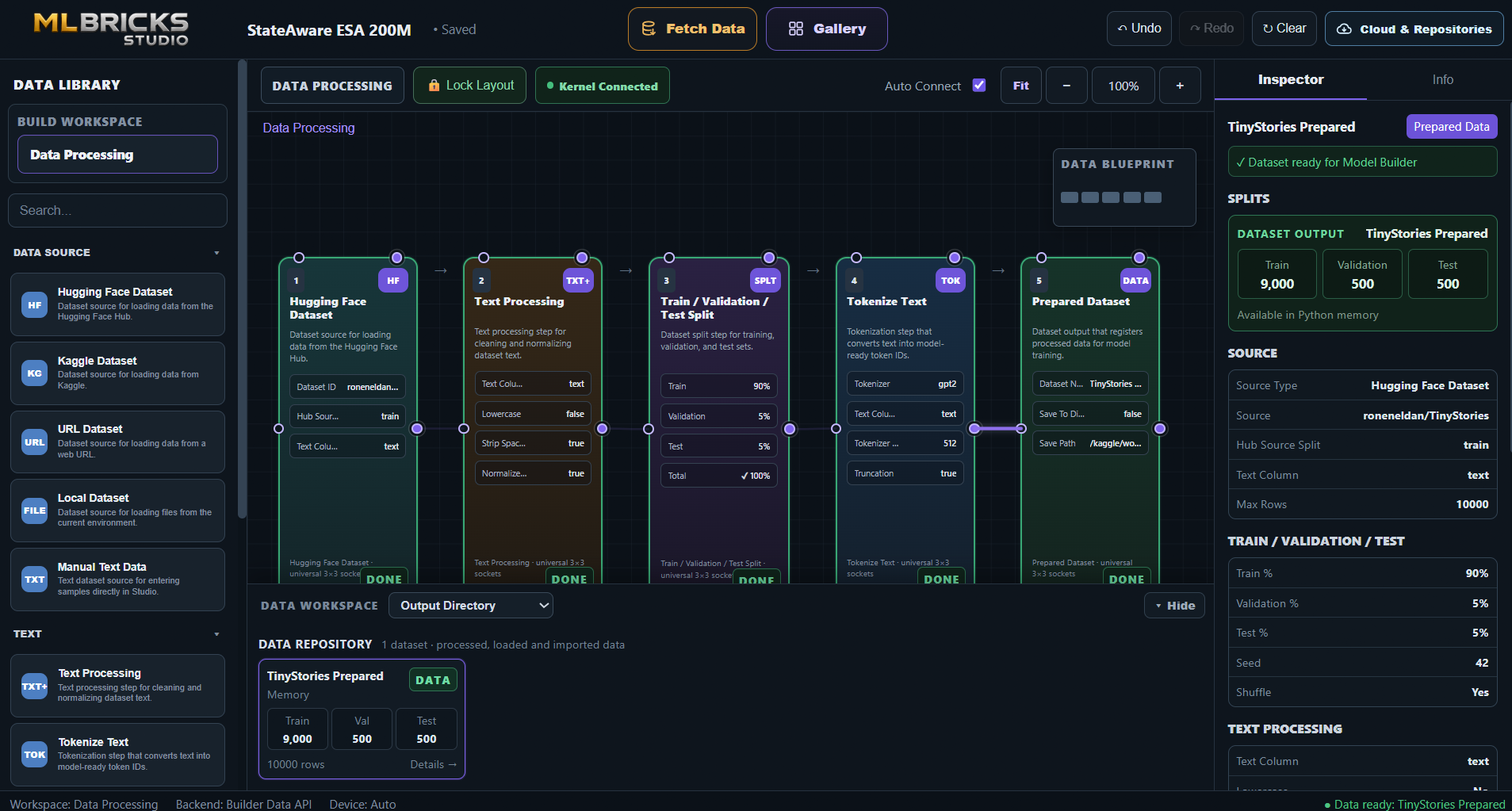
MLBricks Studio keeps the data path visible as a connected graph. Learners can choose a source, configure each processing brick, follow connections across the canvas and inspect the resulting dataset without leaving the workspace.
The current Data Processing view brings together the Data Library, processing graph, live Inspector and Data Repository. A Hugging Face dataset can move through text processing, train/validation/test splitting and tokenization into a prepared dataset that is ready for Model Builder.
[ WHY MLBRICKS STUDIO ]
Learning becomes more meaningful when a learner can connect a concept to a visible system and then experiment with it. MLBricks Studio is designed as a bridge from first contact with AI to real model-building practice.
Layers, data flow, skip paths, inputs and outputs are visible as a graph instead of being buried inside a codebase.
Swap a brick, change a width, move a connection or modify runtime settings and observe what the change means.
Supported graphs compile into real PyTorch/MLBricks modules; training, validation and generation are connected to the Python kernel.
The Inspector exposes the underlying component API. Visual building is an entry point, not a replacement for deeper technical understanding.
Research on visual programming has repeatedly found that reducing syntax burden can make computational ideas more accessible to novices and let learners focus more on structure and semantics. MLBricks Studio applies that learning principle to model architecture while keeping real APIs and runtime behavior visible.
[ AI ACROSS THE CURRICULUM ]
UNESCO has argued that AI literacy should be developed broadly and considered across sciences, humanities and the arts. MLBricks Studio’s long-term educational direction is to make the same model-building language approachable from any discipline.
Connect functions, probability, optimization, vectors and loss to a model that can actually be changed and trained.
Use datasets as the entry point for learning how models detect structure in text, sequences, measurements or images.
Use AI as another computational tool alongside simulation, measurements, sensors and experimental data.
Explore how text becomes tokens, representations and predictions—and learn to question model outputs, bias and evidence.
Learn the pipeline from data preparation to model choice, evaluation, deployment and responsible interpretation.
Image and audio data workflows create a path toward understanding how generative and perceptual systems are assembled.
These are learning/application directions, not a claim that v1.0.0 Beta already ships a finished training template for every discipline. The current real model executor is strongest for supported text language-model graphs; MLBricks Studio already exposes image/audio data processing and broader model components for continued expansion.
[ ONE WORKFLOW ]
MLBricks Studio connects the educational path and the engineering path instead of treating them as separate products.
[ WHAT IT CAN DO TODAY ]
The features below are grounded in the MLBricks Studio v1.0.0 Beta source. Where something is a roadmap direction rather than a shipping capability, it is marked explicitly.
Drag model bricks into a left-to-right graph, use Auto Connect or manual ports, create skip/extra paths, open nested reusable layers, and inspect the installed MLBricks API from the right panel.
VISUAL ARCHITECTUREUse Hugging Face, Kaggle, URL or local sources; clean and split text, tokenize it, process image/audio datasets, create DataLoaders and register Prepared Datasets.
DATA WORKSPACESupported text LM graphs compile to a realtorch.nn.Module, train with optimizer/validation/checkpoints, then generate through the selected runtime configuration.
Select CPU or visible GPUs, Auto/Native/PyTorch backend policy, eager or compiled execution, compile mode, and FP32/FP16/BF16 precision.
LOCAL / NOTEBOOK / SERVERSave model layouts, custom bricks and data pipelines; keep built/imported models in Model Repository and prepared datasets in Data Repository.
REUSEMove datasets, models or complete MLBricks Studio projects through Hugging Face, GitHub, AWS S3, Google Cloud Storage and Azure Blob Storage.
PORTABLE .MLBRICKS BUNDLESScan local/Kaggle/Colab-style paths recursively for compatible model checkpoints, MLBricks Studio bundles and datasets, then restore them into the repositories.
FILESYSTEMStart a local HTTP model server with browser playground, health/model endpoints, generation and OpenAI-style completion routes. Use localhost, LAN, or an optional public HTTPS tunnel.
API + WEB PLAYGROUND[ MODEL → DEVICE ]
A trained or imported model can become a service that another application, computer, phone or embedded system calls.
The server loads the selected model and keeps it resident while requests arrive.
Use the generated local URL from tools or apps running on the host.
Call the model from another device on the same network when the environment permits LAN access.
Optionally expose the notebook/server through an ngrok tunnel for remote access.
GET /healthGET /v1/modelPOST /v1/generatePOST /v1/completionsBearer API-key protection is enabled by default. API keys and tunnel tokens are treated as session values rather than serialized project content.
[ DATA & CLOUD ]
AI learning becomes more practical when models and datasets are portable instead of trapped in one notebook session.
Push/load MLBricks Studio datasets, trained model packages and projects. Private repositories use locally authenticated credentials.
Store and restore MLBricks bundles through a familiar development repository.
Push and pull portable.mlbricks.zipbundles through S3, Google Cloud Storage and Azure Blob Storage.
v1.0.0 Beta does not ship a direct SQL/NoSQL database source node. A natural extension is a database/API adapter layer feeding the existing Data Processing workspace while preserving credentials outside project files.
Hugging Face tokens, GitHub tokens, AWS keys, Google service-account JSON, Azure connection strings, API keys and tunnel tokens are intentionally excluded from normal MLBricks Studio design serialization/cloud bundles in the current implementation.
[ FOR BEGINNERS → FOR BUILDERS ]
The goal is not to keep learners permanently inside a simplified interface. The goal is to give them a path into the real concepts without making syntax the first barrier.
Use Gallery examples, inspect components, follow connections and learn what an input, embedding, mixer, FFN, residual and head actually do.
Edit model settings, connect a prepared dataset, choose runtime/device settings, train, validate and compare outputs.
Create nested custom bricks, manual signal paths, reusable models and data pipelines, then export or publish the result.
Serve it through an API, connect a web app/device, or move the model and project into a repository.
[ RESEARCH CONTEXT ]
These sources motivate the educational direction; they are not evaluations of MLBricks Studio itself.
UNESCO’s student framework organizes AI competency across human-centred mindset, ethics, AI techniques/applications and AI system design, with progression through understanding, application and creation.
Read framework ↗The joint framework describes AI literacy as knowledge, skills and attitudes that help learners understand systems, critically evaluate outputs, and use AI ethically and creatively.
Read framework ↗Research on novice visual programming reports that graphical interfaces can reduce syntax-related difficulty and make computational structures more approachable, especially for learners without a computer-science background.
Read study ↗A biology student, artist, teacher or physicist should be able to understand the architecture of an AI system, build a small one, evaluate it, and connect it to their own domain. Deeper mathematics and programming can then become tools for going further—not gates that decide who is allowed to begin.
[ START IN A NOTEBOOK ]
MLBricks Studio uses the standard notebook/Python environment as its execution host. The visual workspace can run in Jupyter/Kaggle and the full-window interface remains connected to the Python kernel.
pip install mlbricks-Studio

from mlbstudio import Builder

builder = Builder()
builder.web()[ MLBRICKS STUDIO ]
Start with a visual model. Bring data from a subject you understand. Train it. Question it. Share it. Then go deeper.